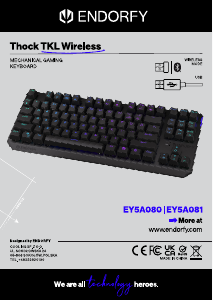
मैनुअल Endorfy EY5G005 Thock TKL Wireless कीबोर्ड

आपके Endorfy EY5G005 Thock TKL Wireless कीबोर्ड के लिए मैनुअल की आवश्यकता है? नीचे आप हिंदी में पीडीएफ मैनुअल मुफ्त में देख और डाउनलोड कर सकते हैं। इस उत्पाद पर वर्तमान में 2 अक्सर पूछे जाने वाले प्रश्न, 0 टिप्पणियाँ और 0 वोट हैं। यदि यह वह मैनुअल नहीं है जो आप चाहते हैं, तो कृपया हमसे संपर्क करें।

क्या आपका उत्पाद खराब है और मैनुअल में कोई समाधान नहीं दिया गया है? मुफ्त मरम्मत सेवाओं के लिए Repair Café को देखें।

मैनुअल
+
=
=
=
+
+
=
+
=
+
=
+
+
=
Thock TKL Wireless
MECHANICAL GAMING KEYBOARD
CUSTOMER SERVICE
ENDORFY.COM/CONTACT
DETAILED INFO
ENDORFY.COM/KB/EYGTHOCKTKLWIRELESS
  
EN
IT
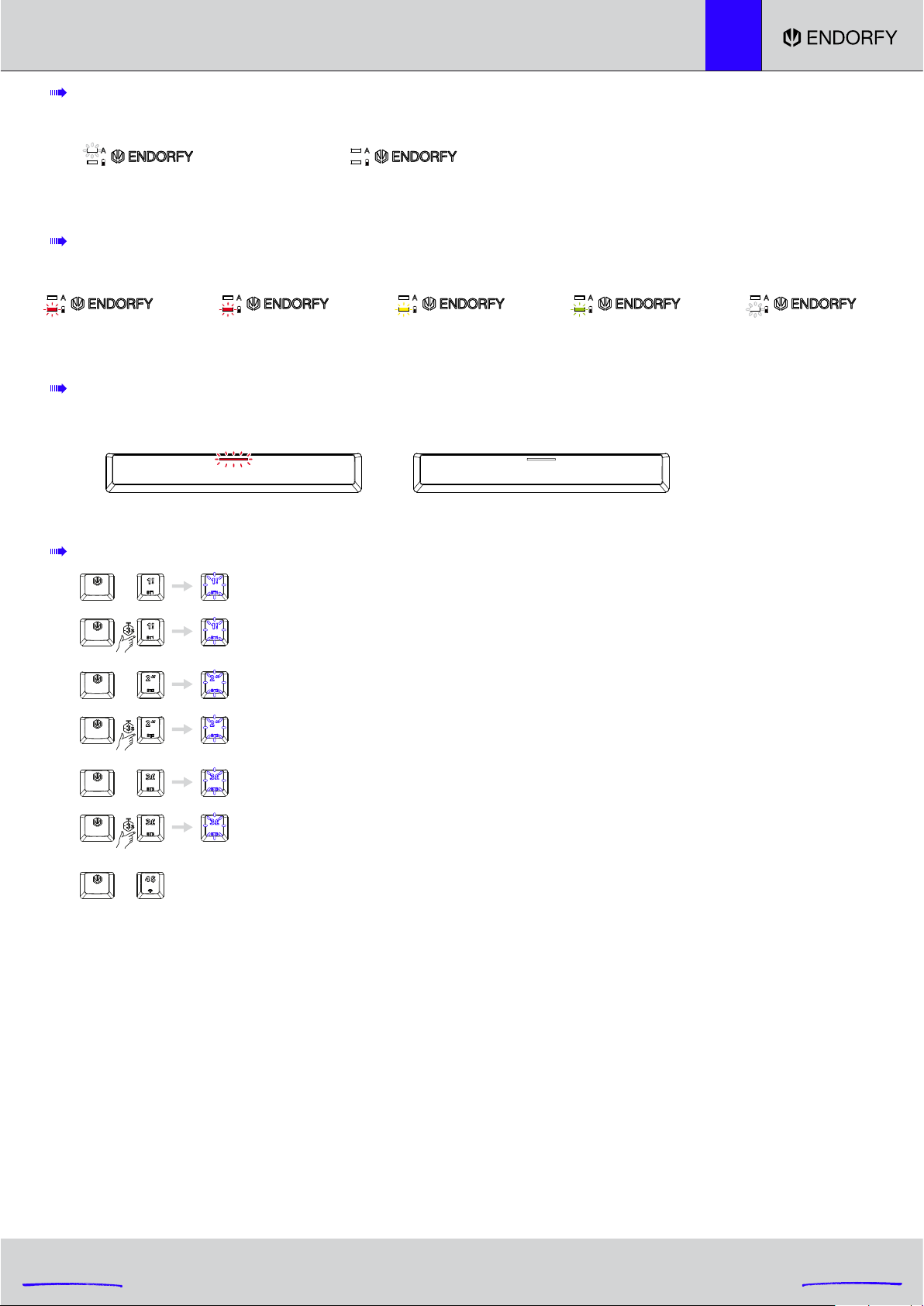
WIRELESS MODE (Bluetooth & 2.4G)
Connection in the 2.4G mode (USB receiver)
Pairing Bluetooth 2 device: The [2 @] key turns white and starts blinking. After successful pairing,
the [2 @] key will once again turn the same colour as the keyboard backlight from before pairing.
After failed pairing, the pairing mode will be switched o after 180 seconds.
The [2 @] key will once again turn the same colour as the keyboard backlight from before pairing.
Pairing Bluetooth 1 device: The [1 !] key turns white and starts blinking. After successful pairing,
the [1 !] key will once again turn the same colour as the keyboard backlight from before pairing.
After failed pairing, the pairing mode will be switched o after 180 seconds.
The [1 !] key will once again turn the same colour as the keyboard backlight from before pairing.
Selecting Bluetooth 2 device
Selecting Bluetooth 1 device
Pairing Bluetooth 3 device: The [3 #] key turns white and starts blinking. After successful pairing,
the [3 #] key will once again turn the same colour as the keyboard backlight from before pairing.
After failed pairing, the pairing mode will be switched o after 180 seconds.
The [3 #] key will once again turn the same colour as the keyboard backlight from before pairing.
Selecting Bluetooth 3 device
After the first pairing, during the following connection, the [1 !], [2 @] or [3 #] key (depending on the selected device: BT1, BT2 or BT3) will be backlit
in white. After successful pairing, the [1 !], [2 @] or [3 #] key (depending on the selected device: BT1, BT2 or BT3) will turn the same colour as the
keyboard backlight. If the keyboard cannot be paired with the selected device within 180 s, the pairing mode will be disabled. Then, the [1 !], [2 @] or
[3 #] key (depending on the selected device: BT1, BT2 or BT3) will turn the same colour as the keyboard backlight.
In the wireless mode (Bluetooth and 2.4G), if the keyboard is not used for 5 minutes, the device will enter the first level of the sleep mode, and LED
backlight will be disabled. Press any button to switch the LED backlight of the keyboard back on after the device has entered the first level of sleep
mode.
In the wireless mode (Bluetooth and 2.4G), if the keyboard is not used for 30 minutes, the device will enter the second level of the sleep mode, and
LED backlight will be disabled along with Bluetooth communication. Then, press any button to switch the LED backlight of the keyboard and
Bluetooth communication back on after the device has entered the second level of sleep mode.
BATTERY SUPPLY (ONLY IN WIRELESS MODE)
BATTERY CHARGE INDICATOR
(WIRELESS MODE WITH THE CABLE CONNECTED; WIRED MODE, ACTIVE WHEN THE KEYBOARD IS OFF)
CAPS LOCK INDICATOR
Caps on
white
0-100%
red
Fully charged
o
Caps o
o
Low battery 0-20% 20-50% 50-90%
blinking red red yellow green
90-100%
white
हिंदी में मैनुअल डाउनलोड करें (PDF, 8.69 MB)
(पर्यावरण का ध्यान रखें और मैनुअल को तभी प्रिंट करें जब इसकी वास्तव में ज़रूरत हो)

रेटिंग

उत्पाद की रेटिंग देकर, हमें बताएं कि आप Endorfy EY5G005 Thock TKL Wireless कीबोर्ड के बारे में क्या सोचते हैं। क्या आप इस उत्पाद के बारे में अपने अनुभव साझा करना चाहते हैं या प्रश्न पूछना चाहते हैं? कृपया पेज के निचले हिस्से में टिप्पणी लिखें।
क्या आप Endorfy EY5G005 Thock TKL Wireless कीबोर्ड से संतुष्ट हैं?
हां नहीं
इस उत्पाद की रेटिंग करने वाले पहले व्यक्ति बनें
0 वोट

इस उत्पाद के बारे में बातचीत में भागीदारी करें

आप Endorfy EY5G005 Thock TKL Wireless कीबोर्डके बारे में क्या सोचते हैं, यहां पर उसे आप साझा कर सकते हैं। यदि आपका कोई प्रश्न है, तो सबसे पहले सावधानी से मैनुअल को पढ़ें। हमारे संपर्क फॉर्म का इस्तेमाल करके मैनुअल का अनुरोध किया जा सकता है।

इस मैनुअल के बारे में अधिक जानकारी

हम समझते हैं कि आपके Endorfy EY5G005 Thock TKL Wireless कीबोर्डके लिए पेपर मैनुअल होना बेहतर होगा। आप हमेशा हमारी वेबसाइट से मैनुअल डाउनलोड कर सकते हैं और खुद इसे प्रिंट कर सकते हैं। यदि आप मूल मैनुअल प्राप्त करना चाहते हैं, तो हम आपको Endorfy से संपर्क करने की सिफारिश करते हैं। वे संभवत: मूल मैनुअल प्रदान कर सकते हैं। क्या आप अपने Endorfy EY5G005 Thock TKL Wireless कीबोर्ड के लिए अलग भाषा में मैनुअल की खोज़ कर रहे हैं? हमारे होम पेज़ पर अपनी पंसदीदा भाषा चुने तथा मॉडल नम्बर की खोज करें ताकि आप यह देख सकें कि क्या यह उपलब्ध है।

स्पेसिफिकेशन

ब्रांड Endorfy
मॉडल EY5G005 Thock TKL Wireless
श्रेणी कीबोर्ड्स
फाइल प्रकार PDF
फाइल साइज़ 8.69 MB

Endorfy कीबोर्ड्स के लिए सभी मैनुअल
कीबोर्ड्स के और मैनुअल

Endorfy EY5G005 Thock TKL Wireless कीबोर्ड के बारे में अक्सर पूछे जाने वाले प्रश्न

हमारी सहायता टीम द्वारा उपयोगी उत्पाद जानकारी की खोज की जाती है और अक्सर पूछे जाने वाले प्रश्नों के उत्तर दिए जाते हैं। यदि हमारे अक्सर पूछे जाने वाले प्रश्नों में आपको कोई गलती नज़र आती है, तो संपर्क फॉर्म का इस्तेमाल करके, कृपया हम से संपर्क करें।

कीबोर्ड पर अक्षर उस स्थान पर नहीं हैं जहां मैं आदी हूं, ऐसा क्यों है? सत्यापित किया गया

अधिकांश कीबोर्ड QWERTY लेआउट का उपयोग करते हैं, जो कीबोर्ड पर पहले छह अक्षरों के लिए होता है। हालाँकि, अलग-अलग कीबोर्ड लेआउट हैं, जो किसी निश्चित भाषा की विशिष्ट आवश्यकताओं से मेल खाते हैं। यह भी संभव है कि कीबोर्ड कीज़ की अदला-बदली की गई हो। विशेषकर पुराने कीबोर्ड के साथ ऐसा करना आसान है।

यह उपयोगी साबित हुआ था (1357) और पढ़ें

मेरे कीबोर्ड को साफ़ करने का सबसे अच्छा तरीका क्या है? सत्यापित किया गया

चाबियों के किनारों के बीच कभी भी वस्तुएं न डालें, क्योंकि इससे मुख्य रूप से गंदगी अंदर चली जाएगी और कीबोर्ड को नुकसान पहुंचेगा। कीबोर्ड को उल्टा रखते हुए संपीड़ित हवा से कीबोर्ड को साफ करना सबसे अच्छा है। चाबियों के ऊपरी हिस्से को थोड़े गीले कपड़े से साफ किया जा सकता है।

यह उपयोगी साबित हुआ था (201) और पढ़ें
मैनुअल Endorfy EY5G005 Thock TKL Wireless कीबोर्ड

संबंधित उत्पाद

संबंधित श्रेणियाँ

×
Download